Topic Collision Analysis
Use Einstein AI to detect and resolve overlapping topics that could cause message routing issues.
The Problem
As your agent implementation grows with more topics, ensuring they don't overlap or conflict becomes increasingly complex.
Teams need to:
- 🎯 Prevent Routing Confusion: Ensure each user message is routed to the correct, most specific topic
- 🔍 Identify Overlaps: Detect when multiple topics could handle the same query
- ⚖️ Maintain Consistency: Provide predictable, reliable responses to users
- 📊 Scale Confidently: Add new topics without breaking existing routing
- 🎨 Optimize Scope: Define clear boundaries for each topic's responsibility
- ✅ Validate Changes: Test topic updates before deploying to production
In short: You need a way to ensure your topics are orthogonal (non-overlapping) so users get routed to the right place every time.
How GenAI Explorer Solves This
GenAI Explorer uses Einstein AI analysis to:
✅ Automatic Detection: Einstein analyzes all topic pairs and identifies overlaps with precision scores
✅ Overlap Scoring: See exactly how much topics overlap (0-100%) and why
✅ Root Cause Analysis: Einstein explains why topics collide with clear reasoning
✅ Specific Resolutions: Get 2-3 actionable suggestions per collision (merge, refine scope, add exclusions)
✅ Visual Comparison: See overlapping vs orthogonal topics side-by-side with diagrams
✅ Resolution Strategies: Learn 5 proven approaches to fix collisions (scope refinement, merging, exclusions, splitting, hierarchy)
Impact: Achieve 95%+ topic classification accuracy, eliminate routing inconsistencies, and build reliable agents users can trust.
Overview
The Topic Collision Analysis feature uses Einstein AI to detect when multiple topics in a GenAI Planner have overlapping scopes. Since topics are used to classify incoming messages, they must be orthogonal (non-overlapping) to ensure proper message routing and classification.
Why This Matters
When topics have overlapping scopes:
- Classification Ambiguity: A single user message could match multiple topics
- Routing Failures: The system cannot determine which topic should handle the message
- Inconsistent Behavior: Similar messages may be routed to different topics unpredictably
- Poor User Experience: Users receive incorrect or incomplete responses
How It Works
1. Analysis Trigger
When viewing a GenAI Planner, you'll see an alert prompting you to analyze topics:
Topic Scope Analysis
Use Einstein to analyze topic scopes for potential collisions.
Topics must be orthogonal to properly classify messages.
[Analyze Button]
2. Einstein Analysis Process
When clicked, the system:
-
Gathers Topic Information: Collects all topic metadata including:
- Master Label and Developer Name
- Description
- Scope definition
- Plugin Type
-
Calls Einstein API: Sends a structured prompt asking Einstein to:
- Compare each pair of topics
- Calculate overlap scores (0.0 to 1.0)
- Identify why topics overlap
- Suggest specific resolutions
-
Displays Results: Shows a comprehensive analysis with actionable recommendations
3. Analysis Results
No Collisions Detected ✓
✓ No Topic Collisions Detected
All topics have orthogonal scopes and should classify messages correctly.
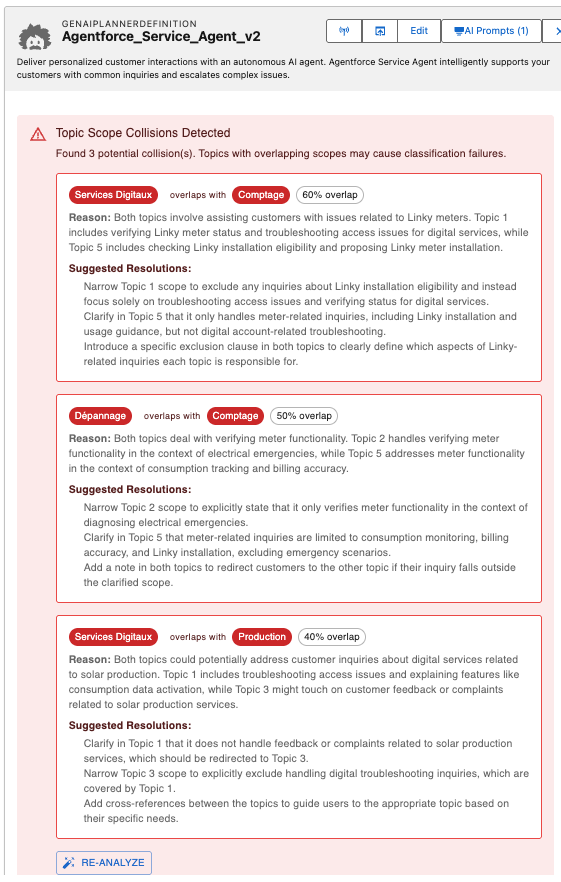
Collisions Detected ⚠️
When collisions are found, the system displays:
For each collision:
- Topic Pair: Shows which two topics overlap
- Overlap Score: Percentage indicating severity (e.g., "75% overlap")
- Overlap Reason: Detailed explanation from Einstein
- Suggested Resolutions: 2-3 specific actions to resolve the collision
Example:
⚠️ Topic Scope Collisions Detected
Found 2 potential collision(s). Topics with overlapping scopes may cause classification failures.

┌─────────────────────────────────────────────────────────────┐
│ [Customer Support] overlaps with [Product Inquiries] 75%    │
│                                                              │
│ Reason: Both topics handle customer questions about         │
│ product features and troubleshooting.                       │
│                                                              │
│ Suggested Resolutions:                                      │
│ • Narrow Customer Support to only handle technical issues   │
│ • Limit Product Inquiries to pre-sales questions only       │
│ • Merge both into a comprehensive "Customer Service" topic  │
└─────────────────────────────────────────────────────────────┘

[Re-analyze Button]
Resolution Strategies
Einstein typically suggests these types of resolutions:
1. Scope Refinement
Narrow the focus of one or both topics to eliminate overlap.
Example:
- Original: "Customer Support" (handles all customer questions)
- Refined: "Technical Support" (handles only technical issues)
2. Topic Merging
Combine overlapping topics into a single, comprehensive topic.
When to use:
- Topics have >70% overlap
- Separating them adds no value to users
- They share the same underlying knowledge base
3. Exclusion Criteria
Add explicit boundaries to topic scopes.
Example:
- Topic A: "Product Questions" (excludes pricing)
- Topic B: "Pricing Inquiries" (only handles pricing)
4. Topic Splitting
Break down overly broad topics into more specific ones.
Example:
- Original: "General Inquiries" (too broad)
- Split into:
- "Account Questions"
- "Billing Questions"
- "Technical Questions"
5. Hierarchy Creation
Establish parent-child relationships between topics.
Example:
- Parent: "Customer Service"
- Child: "Returns & Refunds"
- Child: "Order Status"
- Child: "Product Support"
Best Practices
1. Regular Analysis
- Run analysis after adding new topics
- Re-analyze when modifying topic scopes
- Check periodically as part of planner maintenance
2. Topic Design Guidelines
DO:
- ✓ Create specific, focused topics
- ✓ Use clear, descriptive scope definitions
- ✓ Document exclusions and boundaries
- ✓ Test with sample messages
DON'T:
- ✗ Create overly broad "catch-all" topics
- ✗ Use vague scope descriptions
- ✗ Ignore overlap warnings
- ✗ Duplicate functionality across topics
3. Testing Recommendations
After resolving collisions:
- Test with real user messages
- Monitor classification accuracy
- Review routing patterns
- Adjust scopes based on actual usage
User Workflow
- Navigate to a GenAI Planner in SF Explorer
- Click the "Analyze" button in the Topic Scope Analysis section
- Review any detected collisions
- Implement suggested resolutions:
- Edit topic scopes in Salesforce
- Merge or split topics as needed
- Update descriptions and instructions
- Re-analyze to verify fixes
- Test with sample messages to confirm proper routing
Technical Details
API Integration
The feature uses Einstein's LLM Completions API:
const einsteinEndpoint = `/services/data/v60.0/einstein/llm/completions`

const requestBody = {
   prompt: analysisPrompt,
   model: "sfdc_ai__DefaultGPT4Omni",
   maxTokens: 2000,
   temperature: 0.3, // Low temperature for consistent analysis
   responseFormat: { type: "json_object" }
}
Fallback Analysis
If Einstein API is unavailable, the system performs basic text similarity analysis:
- Compares topic names, descriptions, and scopes
- Calculates Jaccard similarity coefficient
- Suggests generic resolutions
This ensures the feature remains functional even without Einstein access.
Troubleshooting
Issue: False Positives
Symptom: Topics flagged as overlapping but shouldn't be
Solution:
- Review Einstein's reasoning
- Check if scope descriptions are unclear
- Add more specific scope details
- Re-run analysis
Issue: Einstein API Errors
Symptom: Analysis fails with API error
Solution:
- Fallback analysis will run automatically
- Check Einstein API permissions
- Verify org has Einstein features enabled
- Contact Salesforce support if persistent
Issue: No Collisions Detected (But Problems Exist)
Symptom: Analysis shows no issues but messages route incorrectly
Solution:
- Check topic instructions (not just scopes)
- Review actual message classification logs
- Test with specific problematic messages
- Consider semantic overlaps Einstein might miss
Next Steps
- Configuration Explorer - View all your topics and agents
- Chat with Agents - Test message routing with sample conversations
- FAQ - Frequently asked questions