Einstein Model Testing
Test and compare Einstein AI models directly from your browser with custom prompts, parameter control, sustainability metrics, and real-time cost analysis.
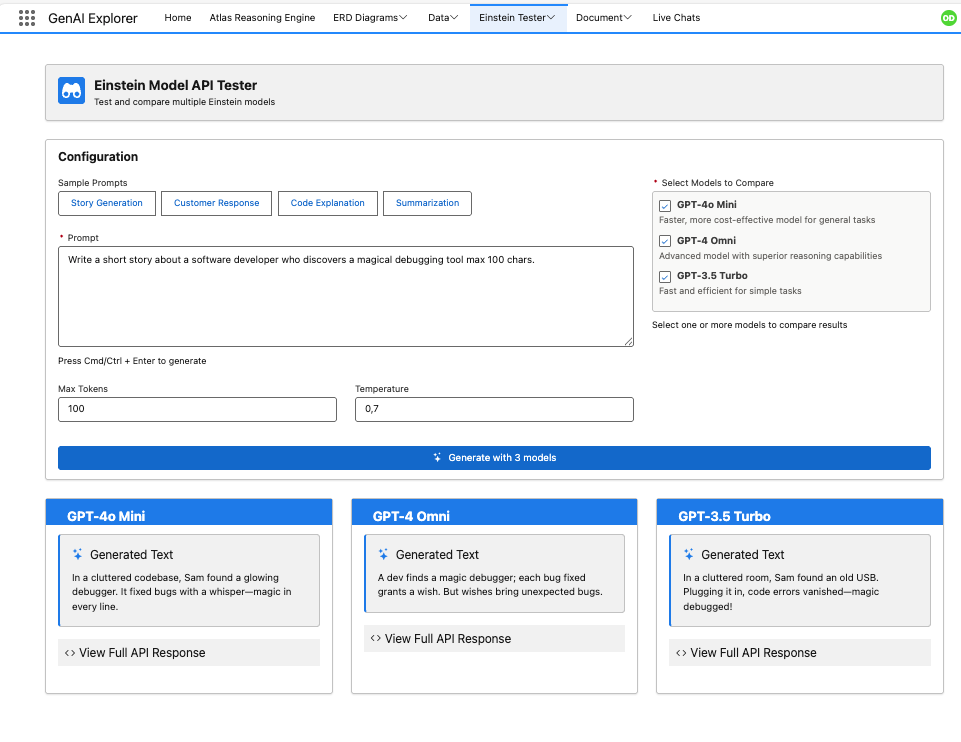
The Problem
Choosing the right AI model for your use case requires understanding the tradeoffs between cost, speed, quality, and environmental impact.
When building AI solutions, teams need to:
- 🎯 Model Selection: Determine which model provides the best balance for specific use cases
- 💰 Cost Optimization: Understand token consumption and pricing implications
- 🌍 Sustainability: Monitor CO₂ emissions and water consumption
- ⚡ Performance Testing: Compare response times across different models
- 🎨 Quality Assessment: Evaluate output quality for your specific prompts
- 🔧 Parameter Tuning: Experiment with temperature, max tokens, and other settings
- 📊 Side-by-Side Comparison: Test multiple models with identical inputs
In short: You need a sandbox to experiment with different models and parameters before committing to production.
How GenAI Explorer Solves This
GenAI Explorer provides comprehensive model testing with:
✅ Side-by-Side Comparison: Test multiple models with identical prompts simultaneously
✅ 20+ Einstein Models: Compare across providers
- OpenAI (GPT-4o, GPT-4.1, GPT-5, O3, O4 Mini)
- Anthropic (Claude Sonnet 4.5, Claude 3 Haiku)
- Google (Gemini 2.5 Pro, Gemini 2.5 Flash)
- Amazon (Nova Pro, Nova Lite)
✅ Sustainability Metrics: Real-time environmental impact tracking
- CO₂ emissions per request (grams)
- Water consumption (liters)
- Relatable equivalents (car km, smartphone charges)
- Sustainability ratings (A+ to D)
✅ Cost Transparency: See token usage and estimated costs in real-time
✅ Parameter Control: Adjust and understand key settings
- Temperature (creativity vs consistency)
- Max tokens (response length limits)
✅ Sample Prompts Library: Pre-built prompts for common scenarios
✅ Prompt History: Automatically saves all your tests
- Access previous prompts instantly
- Re-run past tests with one click
- Compare results across time
Impact: Choose the right model for each use case, reduce costs by 50-70% with smarter model selection, reduce CO₂ emissions by up to 95%, and validate quality before deployment.
Quick Start Guide
1. Access Model Testing
Navigate to Einstein Model Testing from the main menu.
2. Select Models to Compare
Choose one or more models from 20+ available options:
By Provider:
- OpenAI/Azure: GPT-4o, GPT-4o Mini, GPT-4.1, GPT-5, O3, O4 Mini
- Anthropic (AWS): Claude Sonnet 4.5, Claude 4, Claude 3 Haiku
- Google: Gemini 2.5 Pro, Gemini 2.5 Flash, Gemini 2.0 Flash
- Amazon: Nova Pro, Nova Lite
Pro Tip: Select multiple models to compare results side-by-side.
3. Enter Your Prompt
Type or paste your prompt in the text area.
Try a sample prompt:
Explain quantum computing in simple terms for a 10-year-old.
4. Generate & Compare
Click Generate to see results from all selected models side-by-side with:
- Response content
- Response time
- Token usage
- Cost estimate
- CO₂ emissions
- Water consumption
- Sustainability rating
Key Features
Side-by-Side Comparison
Compare multiple models with identical inputs:
┌─────────────────────────┬─────────────────────────┬─────────────────────────┐
│     GPT-4o Mini         │    Claude 3 Haiku       │   Gemini 2.5 Flash      │
├─────────────────────────┼─────────────────────────┼─────────────────────────┤
│ Response Time: 1.8s     │ Response Time: 0.9s     │ Response Time: 1.2s     │
│ Tokens: 285             │ Tokens: 198             │ Tokens: 220             │
│ Cost: $0.0004           │ Cost: $0.0002           │ Cost: $0.0006           │
│ CO₂: 0.18g              │ CO₂: 0.13g              │ CO₂: 0.12g              │
│ 🟢 A+ Sustainability    │ 🟢 A+ Sustainability    │ 🟢 A+ Sustainability    │
│                         │                         │                         │
│ [Response content]      │ [Response content]      │ [Response content]      │
└─────────────────────────┴─────────────────────────┴─────────────────────────┘
Metrics displayed:
- Response time
- Token usage (input + output)
- Cost estimate (USD)
- CO₂ emissions (grams)
- Water consumption (liters)
- Sustainability rating (A+ to D)
- Relatable equivalents
Sustainability Tracking
Real-time environmental impact monitoring:
- CO₂ Emissions: Measured in grams per request
- Water Consumption: Measured in liters per request
- Relatable Equivalents:
- Car kilometers driven
- Smartphone charges
- Glasses of water
- Tree absorption days
Sustainability Ratings:
- A+: Most efficient (top 20%)
- A: Very efficient
- B: Moderate efficiency
- C: Higher impact
- D: Highest impact
Prompt History
Automatically saves every test you run - never lose your work!
- 📜 Browse History: View all previous prompts and results
- 🔄 One-Click Re-run: Test again with saved settings
- 📊 Compare Results: See how responses changed over time
- 💾 Export Data: Download for analysis or reporting
Model Categories at a Glance
🚀 High Performance (Complex Tasks)
| Model | Cost/1k tokens | CO₂/1k tokens | Rating |
|---|---|---|---|
| GPT-5 | $0.020 | 13.78g | D |
| GPT-4.1 | $0.012 | 0.56g | A+ |
| Gemini 2.5 Pro | $0.010 | 1.54g | A |
| Claude Sonnet 4.5 | $0.018 | 1.20g | A |
⚡ Balanced (General Purpose)
| Model | Cost/1k tokens | CO₂/1k tokens | Rating |
|---|---|---|---|
| GPT-4o Mini | $0.0015 | 0.64g | A+ |
| GPT-4.1 Mini | $0.002 | 0.59g | A+ |
| Gemini 2.5 Flash | $0.0025 | 0.56g | A+ |
| Claude 3.7 Sonnet | $0.015 | 1.18g | A |
💰 Cost-Efficient (High Volume)
| Model | Cost/1k tokens | CO₂/1k tokens | Rating |
|---|---|---|---|
| Claude 3 Haiku | $0.0008 | 0.64g | A+ |
| Amazon Nova Lite | $0.0005 | 0.10g | A+ |
| Gemini 2.0 Flash Lite | $0.0007 | 0.12g | A+ |
Common Use Cases
1. Model Selection for Production
Goal: Choose the right model for your production use case
Process:
- Test your actual use case prompts with relevant models
- Compare quality, speed, cost, and sustainability
- Run multiple variations to test consistency
- Choose the model that best balances your priorities
Example Decision:
- GPT-5 for complex legal document analysis (quality critical)
- GPT-4o Mini for general customer support (balanced)
- Claude 3 Haiku for simple data classification (high volume)
2. Sustainability Optimization
Goal: Reduce environmental impact while maintaining quality
Process:
- Identify current model usage
- Test alternatives with A+ sustainability ratings
- Compare quality differences
- Switch to more efficient models where quality is acceptable
Example Results:
- Switching from GPT-5 to GPT-4.1 Mini:
- 96% reduction in CO₂ emissions
- 90% cost savings
- Quality still excellent for most tasks
3. Cost vs Quality Analysis
Goal: Determine if premium models justify their cost
Example Results (10,000 requests/month):
| Model | Monthly Cost | Monthly CO₂ | Quality |
|---|---|---|---|
| GPT-5 | $200 | 137.8 kg | 98% |
| GPT-4o Mini | $15 | 6.4 kg | 92% |
| Claude 3 Haiku | $8 | 6.4 kg | 88% |
Decision: Use GPT-4o Mini for 90% of requests, GPT-5 for complex cases only.
Documentation
Guides
- Model Comparison - Detailed performance and sustainability analysis of all 20+ models
- Sustainability Guide - Understanding CO₂, water, and environmental metrics
- Parameters Reference - Temperature, tokens, and configuration options
- Sample Prompts - Pre-built prompts for common scenarios
- Best Practices - Tips for effective testing
- Cost Optimization - Strategies to reduce spending
Related Features
- Chat with Agents - Test models in agent context
- RAG & Retriever - Optimize knowledge retrieval
- Prompt Builder - Test prompt templates
Next Steps
- Start Simple: Begin with a basic prompt and compare 2-3 models
- Check Sustainability: Note the CO₂ and cost metrics
- Test Multiple Models: Find the best balance for your use case
- Monitor Impact: Track your cumulative environmental footprint
- Deploy Wisely: Use insights to configure production with sustainability in mind
Effective model testing leads to better AI implementations, significant cost savings, and reduced environmental impact.